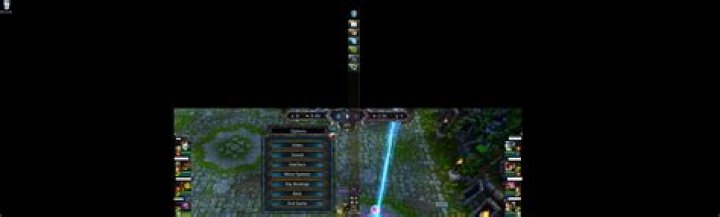
I have dual screen and sometimes when the game loads it sort of loads in the middle of both of them making it impossible to play.
I already have it set to windowed borderless and I´m not going to "turn off my monitor" since that defeats the whole purpose of having dual monitors.
Is there any way to fix this?¨
Here is an image of it happening:
My taskbar being on the right screen which has a slightly lower vertical resolution
Note: I'm running League of legends in Windows 7
26 Answers
Since the launch of spectator mode this has been happening a lot more and with more time for me to actually find solutions I´ve figured out the following.
- Switching ingame settings around from fullscreen/windowed seem to reset it to the correct position
- Moving around the taskbar resets it to the correct position
- Going into the task manager and rightclicking and selecting maximize resets it to the correct position
- This problem is also directly associated with running the game in Borderless Windowed
If you're in a more recent version of Windows, you could try using Win+right-arrow/left-arrow. This normally will move the current active window from screen to screen in multi-monitor setup. Win+up-arrow will maximize the current window.
2You can try running League of Legends in Windowed/Borderless mode. You'll notice a lot of streamers use a similar method.
While in game (this isn't available in the PVP.net Client), go to Menu (ESC) -> Video -> Window Mode and set it to either Windowed or Borderless. Can then place it wherever you like on your expanded desktop.
1I had/have the same problem and I brought it up with the people at Riot's support center and they basically told me that the problem was caused because my graphics card was not good enough to run the game properly.
I recommend updating your computer's graphics card, if that doesn't help I suggest going to to seek more help.
I only have that effect when i go into a game and before the game loads (on champion selection) i switch to some other window on the second monitor. If i don't alt-tab away until the load screen appears it loads fine on the primary monitor.
I switched to windowed with borders so i can move the window into the right position if that happens.
you can fix this temporarily while the game is loading by going into your display props, disable the second monitor, then re-enabling it again. you can at least play the game you are loading into then.